Puzzle games are some of the best games to play offline, and a classic block puzzle doesn't need the internet at all: the board, the blocks and the scoring all run on your phone. So it's an ideal game for flights, the underground, long journeys or saving mobile data. Not every game is fully offline, though. Here's how to check, and how to set up Blockfold so it's ready before you lose signal.
Get the game while you're online
- Install the game from Google Play over Wi-Fi.
- Open it once before you travel. This makes sure everything is set up and lets you choose your theme and sound.
- That's it. Blockfold has no downloads, levels or accounts to fetch later.
Check that a game really works offline
Some games say "offline" but still need a connection to start, to show ads, or to save your progress. A quick test:
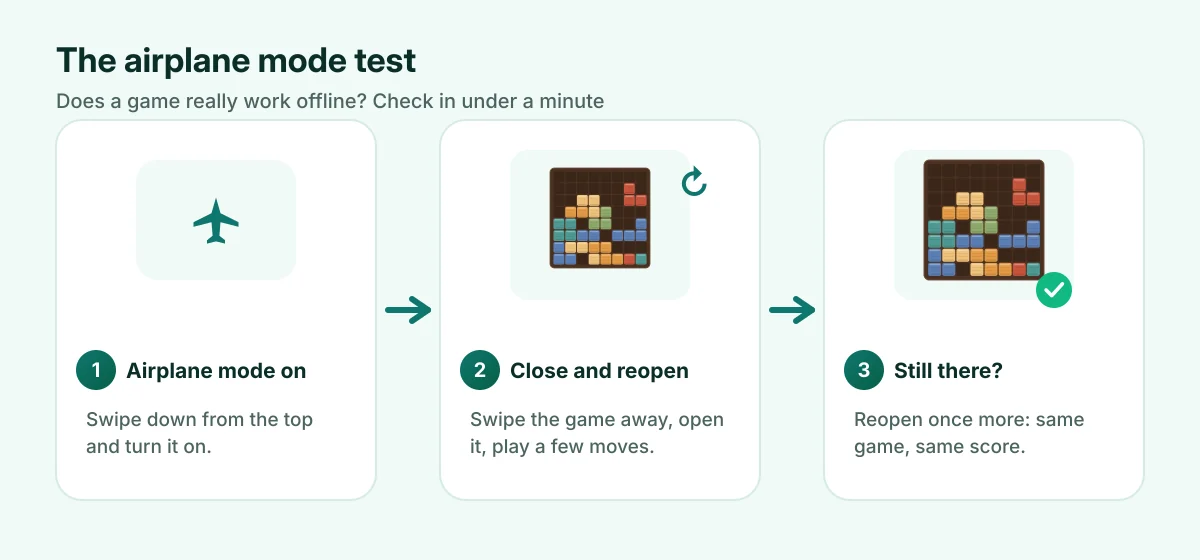
- Turn on airplane mode (swipe down from the top of the screen).
- Close the game completely: open recent apps and swipe it away.
- Open the game again. Does it start without a message about connecting?
- Play a few moves, then close it again.
- Open it once more. Is your game still there, with the same score?
Blockfold passes all five: it has no online features and saves your game after every move.
Save battery on long trips
- Airplane mode itself saves a lot of battery when there's no signal to search for.
- Lower the screen brightness. The screen uses more power than the game.
- Turn sound off if you're on a quiet train: Menu > Sound. Vibration has its own switch.
- Choose a dark look. On phones with OLED screens, the dark Wood and Jewel themes use a little less power than the light Paper theme.
Your scores and progress
Because nothing is online, everything lives on your phone: the game in progress, your best score and your statistics (Menu > Statistics). That also means:
- Nobody else sees your scores, and there's no account to lose.
- Your progress isn't copied to a new phone. If you switch phones, you start fresh.
- Uninstalling the game, or clearing its storage in your phone's settings, deletes your scores.
New to the game? Start with how to play block puzzle.